Try Sora vs Kling: AI Video Generator Comparison
Create videos with Sora vs Kling: AI Video Generator Comparison. Enter your prompt.
Model
Image upload
Prompt
Aspect ratio
Duration
Resolution
Watermark
What's included:
- 3–6 generation attempts
- Pro quality included
- Failed generations don't count
Prompt: A cinematic shot of a lighthouse beam sweeping across the ocean at night.
OpenAI Sora vs Kling AI: Which Video Generator Wins in 2026?
Choosing between OpenAI Sora and Kling AI is one of the most common decisions facing creators who want to produce AI-generated video today. Both platforms have matured rapidly, and each brings genuine strengths to the table. But they are not interchangeable -- Sora and Kling make fundamentally different trade-offs around quality, duration, pricing, and creative control.
This guide breaks down every meaningful difference so you can pick the right model for your next project. We tested both on the same prompts, reviewed the specs, and distilled the results into practical recommendations.
Quick Overview: Sora and Kling at a Glance
Before we get into the details, here is a high-level summary of what each platform offers.
OpenAI Sora is built on a Diffusion Transformer (DiT) architecture that processes video as spacetime latent patches. It ships three model tiers -- Sora 2, Sora Pro, and Sora Storyboard -- covering everything from fast social clips to professional 1080p output.
Kling AI comes from Kuaishou, one of China's largest short-video companies. It offers five distinct models -- Kling 3.0, Kling O3, Kling O1, Kling 2.6, and Kling v2.1 Master -- each optimized for specific workflows, including one that generates synchronized audio.
| Feature | OpenAI Sora | Kling AI |
|---|---|---|
| Developer | OpenAI | Kuaishou |
| Number of Models | 3 | 5+ |
| Max Duration | 25 seconds (Pro) | 10 seconds |
| Max Resolution | 1080p (Pro) | 1080p |
| Audio Generation | No | Yes (Kling 2.6) |
| CFG Control | No | Yes (v2.1 Master) |
| Text-to-Video | All models | Most models |
| Image-to-Video | All models | Most models |
| Price Range | 30-500 credits | 100-140 credits |
Model-by-Model Breakdown
Understanding individual model strengths is critical because "Sora" and "Kling" are not single products. Each family contains specialized variants. Here is what you get from each.
OpenAI Sora Models
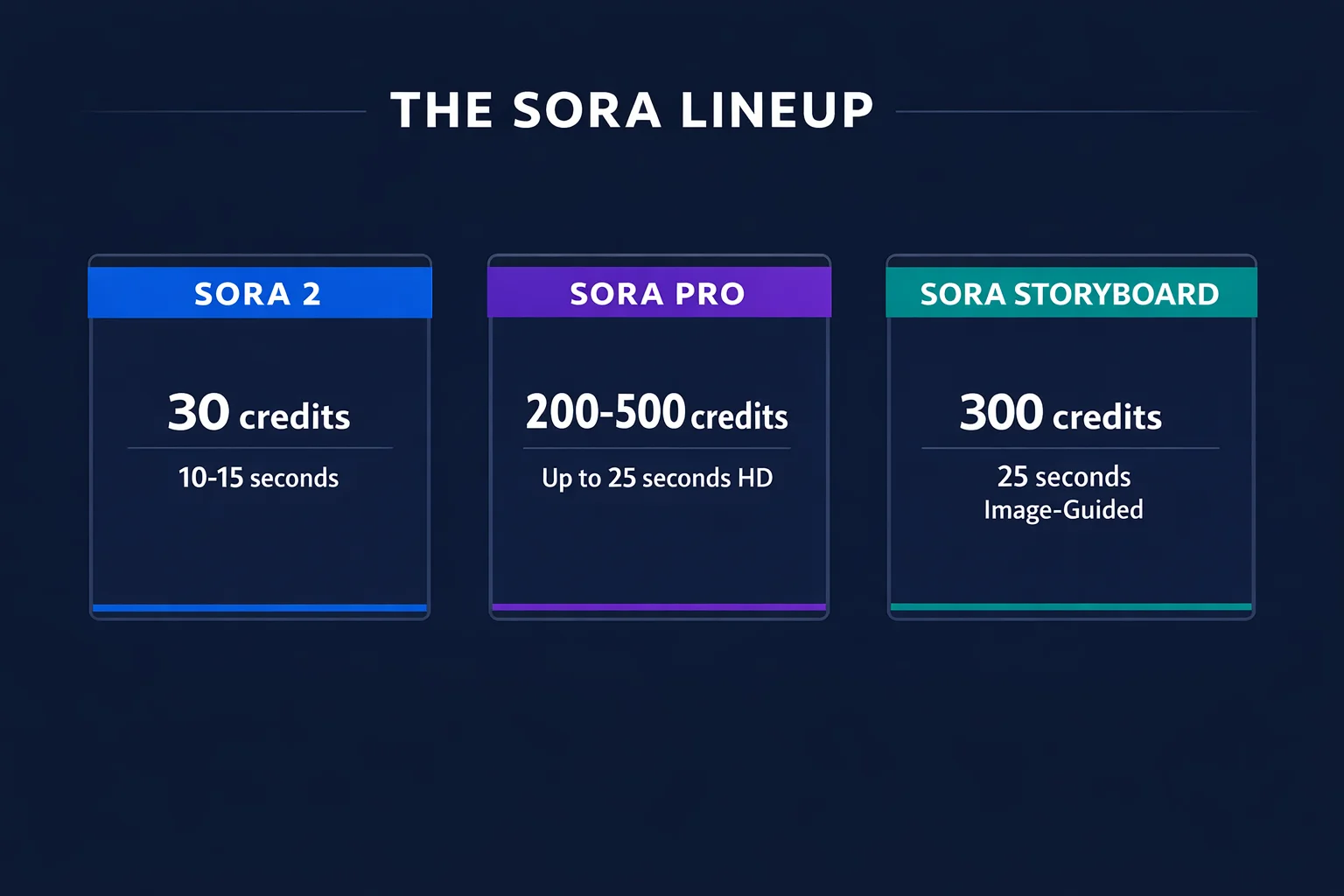
Sora 2 is the everyday workhorse. At 30 credits per generation, it produces 10 to 15-second clips from text or image input. Quality is solid for social media and web content. If you publish to TikTok, Instagram Reels, or YouTube Shorts daily, Sora 2 keeps costs manageable while maintaining consistent output.
Sora Pro steps up to professional territory. It outputs at 720p (200 credits) or 1080p (500 credits) and extends duration to 25 seconds. The physics simulation is noticeably more refined -- fluid dynamics, fabric movement, and lighting behave with broadcast-grade accuracy. Use this when the video will appear in a client presentation, ad campaign, or on a large screen.
Sora Storyboard is purpose-built for image-guided narrative sequences. At 200 credits it produces 25-second videos driven by a reference image. Feed it concept art, product photography, or an illustration, and Storyboard animates it into a coherent story while preserving the original visual style. It requires image input -- text-only prompts are not supported.
Kling AI Models
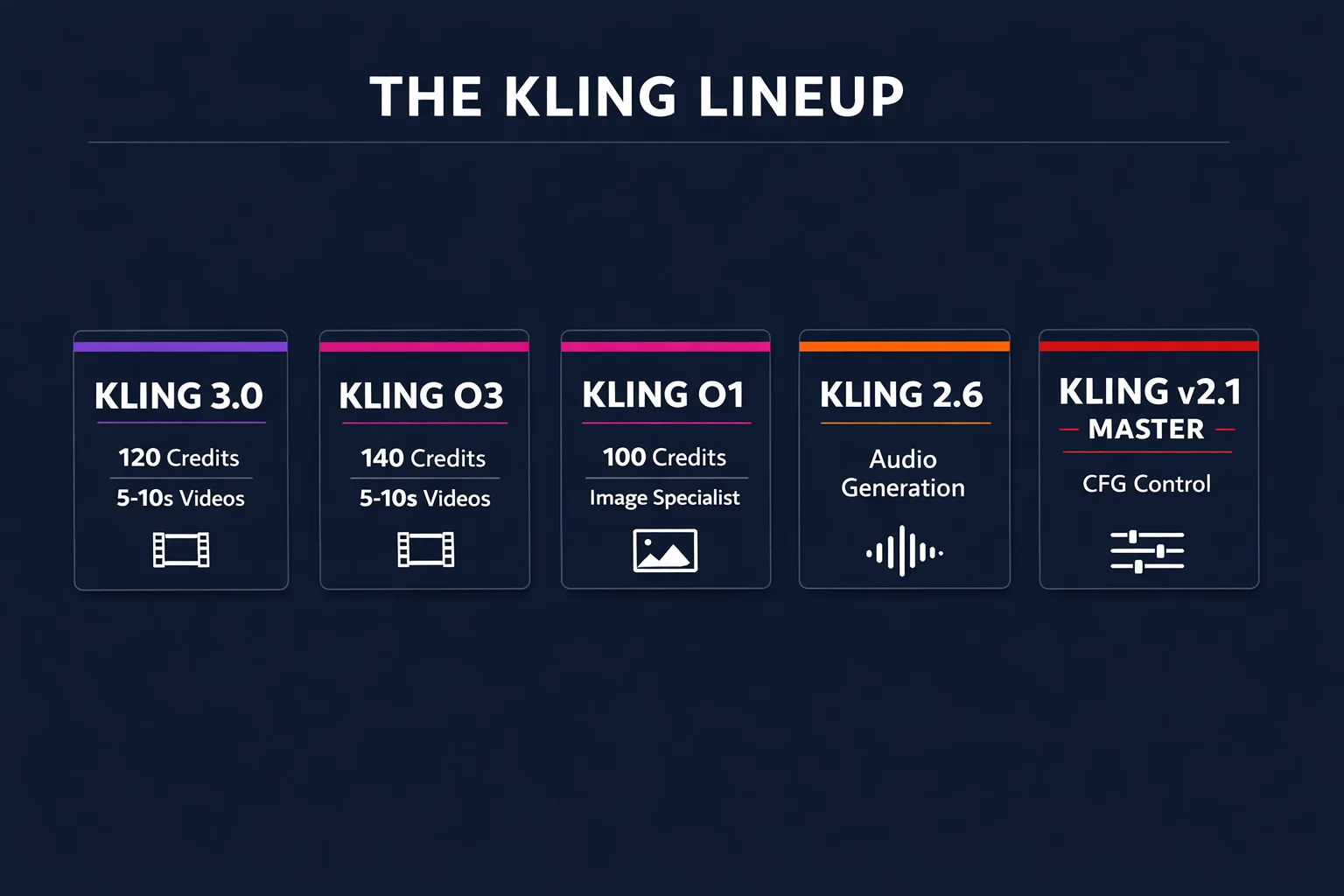
Kling 3.0 is the latest-generation all-rounder. At 120 credits it supports both text and image input at 720p or 1080p, with 5 or 10-second durations. The generation quality represents a meaningful jump from earlier Kling versions in motion coherence and prompt understanding.
Kling O3 costs 140 credits and adds enhanced motion fidelity and visual refinement over 3.0. It shares the same resolution, duration, and input options. Choose O3 when the extra visual polish matters for professional deliverables.
Kling O1 is a dedicated image-to-video specialist at 100 credits. If your workflow centers on animating product shots, portraits, or artwork, O1 is purpose-built for that task with 5 to 10-second output at 720p or 1080p.
Kling 2.6 stands out for its audio generation capability. It produces synchronized sound alongside video -- ambient noise, effects, and atmospheric audio -- from a single prompt. This makes it unique among AI video generators and eliminates a separate audio production step.
Kling v2.1 Master offers adjustable CFG (Classifier-Free Guidance) control. This parameter lets you dial how strictly the output follows your prompt versus allowing creative variation. Advanced users who want precise control over generation behavior will find real value here.
Head-to-Head: Key Comparison Areas
Video Quality and Visual Fidelity
Sora's Diffusion Transformer architecture gives it a measurable edge in two areas: physics simulation and temporal consistency. Objects in Sora videos maintain permanence -- they do not morph, flicker, or vanish behind obstacles. Characters stay visually stable across frames. Our testing showed Sora 2 achieves 84% readable text rendering, which is notable for an AI video model.
Kling 3.0 and O3 produce strong visual quality as well, particularly for short-form content. Motion is smooth and textures render clearly. Where Kling falls slightly behind is in complex multi-subject scenes where several characters interact simultaneously -- Sora handles these with more stability.
However, Kling compensates with variety. Having five specialized models means you can pick the one tuned for your exact use case rather than relying on a general-purpose engine.
Duration and Output Length
This is where the two platforms diverge sharply.
| Model | Duration Options |
|---|---|
| Sora 2 | 10s, 15s |
| Sora Pro | Up to 25s |
| Sora Storyboard | 25s (fixed) |
| Kling 3.0 / O3 / O1 | 5s, 10s |
| Kling 2.6 | 5s, 10s |
| Kling v2.1 Master | 5s, 10s |
If your project needs clips longer than 10 seconds from a single generation, Sora is the only option. Sora Pro and Storyboard both reach 25 seconds, which is enough for a complete narrative beat, product walkthrough, or tutorial segment.
Kling's 5 to 10-second clips cover social media requirements comfortably. TikTok and Reels content often performs best at these lengths. But for anything requiring a developed scene or sustained camera movement, you will need to stitch multiple Kling clips together in post.
Pricing and Credit Efficiency
Cost per generation tells only part of the story. The real question is: how much usable output do you get per credit?
| Model | Credits | Duration | Cost per Second |
|---|---|---|---|
| Sora 2 | 30 | 10-15s | 2-3 credits/s |
| Sora Pro 720p | 200 | Up to 25s | 8 credits/s |
| Sora Pro 1080p | 500 | Up to 25s | 20 credits/s |
| Sora Storyboard | 200 | 25s | 8 credits/s |
| Kling O1 | 100 | 5-10s | 10-20 credits/s |
| Kling 3.0 | 120 | 5-10s | 12-24 credits/s |
| Kling O3 | 140 | 5-10s | 14-28 credits/s |
Sora 2 is the clear value leader at 2 to 3 credits per second of video. For budget-conscious creators publishing daily social content, that pricing is hard to beat. Sora Pro 1080p sits at the premium end at 20 credits per second but delivers broadcast-quality results.
Kling's mid-range pricing (100 to 140 credits) positions it between Sora 2 and Sora Pro. The cost-per-second is higher than Sora 2 due to shorter maximum durations, but you gain access to features like audio generation and CFG control that Sora does not offer.
Audio Generation
This is Kling's exclusive advantage. Kling 2.6 generates synchronized audio alongside video. The model produces ambient sounds, environmental effects, and atmospheric audio that match the visual content. A video of a waterfall includes rushing water sounds. A street scene includes traffic and footsteps.
None of the Sora models generate audio. Every Sora video arrives silent. For social content where autoplay with sound drives engagement, this means an extra production step with Sora that Kling eliminates.
Advanced Controls
Kling v2.1 Master provides CFG control -- a parameter that adjusts how tightly generation follows your prompt. This is a meaningful tool for experienced creators who want to fine-tune the balance between prompt accuracy and natural-looking results.
Sora does not expose comparable parameters. You influence output through prompt engineering and model selection, but there is no numerical control over generation behavior.
For image-to-video workflows, Sora Storyboard offers narrative-focused generation from reference images, while Kling O1 provides a dedicated image animation pipeline. Both are strong but serve different creative goals: Storyboard builds stories; O1 animates stills.
Render Speed
Sora 2 averages 128 seconds to render a 20-second HD clip, with a variance of plus or minus 23 seconds (about 18%). This means generation times are reasonably predictable but not instant. Sora Pro takes longer due to higher resolution processing.
Kling's shorter output durations generally mean faster generation times per clip, though you may need multiple generations to match the total duration Sora produces in one pass.
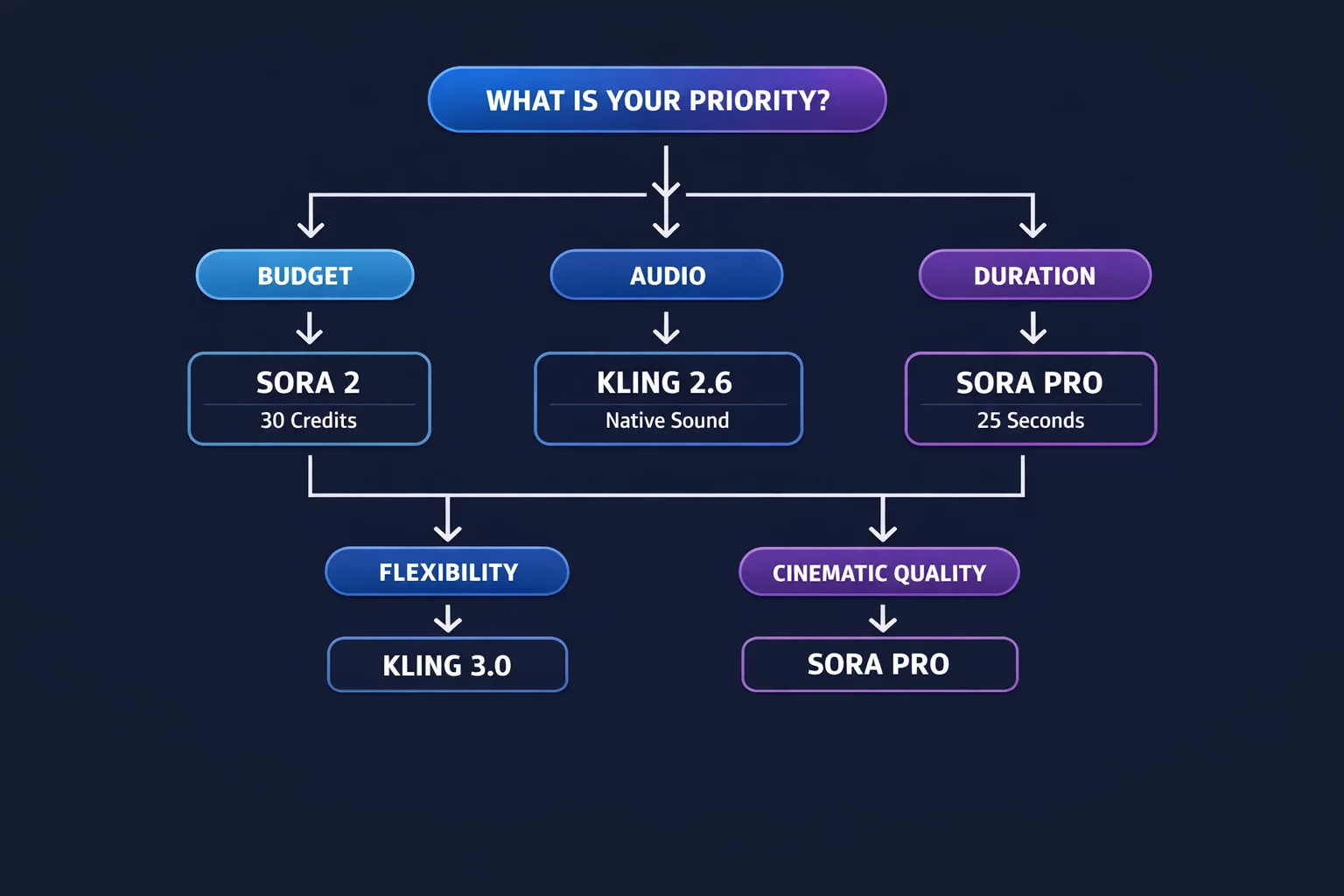
Which Should You Choose? Decision Matrix
Use this framework to match your needs to the right model.
Choose Sora 2 if:
- You produce daily social media content and need high volume at low cost
- Standard quality meets your requirements
- You want 10 to 15-second clips without paying for premium features
- Budget efficiency is your primary concern
Choose Sora Pro if:
- You need HD 720p or 1080p output for professional use
- Your content requires clips longer than 15 seconds
- Physics accuracy and visual fidelity matter for your brand
- The video will appear in presentations, ads, or on large displays
Choose Sora Storyboard if:
- You have reference images you want to animate into narratives
- You need 25-second story sequences
- Your workflow involves concept art, product photography, or illustration
Choose Kling 3.0 or O3 if:
- You want latest-generation quality with both text and image input
- 5 to 10-second durations cover your content needs
- You prefer a balanced option between cost and quality
- You want 1080p output at a lower price than Sora Pro
Choose Kling 2.6 if:
- You need audio generated alongside video
- Social content with sound is your primary output
- You want a complete audiovisual asset from a single prompt
Choose Kling O1 or v2.1 Master if:
- Image animation is your core workflow (O1)
- You want fine-grained control via CFG parameters (Master)
- You are an advanced user who tunes generation settings per project
Real-World Use Cases
Social Media Content at Scale
A creator publishing three TikTok videos per day would spend roughly 90 credits daily using Sora 2 (30 credits per clip at 10 to 15 seconds). That same volume with Kling 3.0 would cost 360 credits daily but would include the option for audio on the Kling 2.6 variant.
The practical takeaway: Sora 2 wins on per-unit economics for silent social clips. Kling 2.6 wins if your content strategy relies on sound.
Marketing Campaign Production
A marketing team building a product launch video needs 1080p quality, smooth physics, and enough duration for a narrative arc. Sora Pro at 500 credits per 25-second 1080p generation delivers this in a single pass. Achieving similar results with Kling would require stitching multiple 10-second O3 clips, adding complexity and cost.
Concept Art Animation
An illustrator wanting to animate portfolio pieces for a client pitch would benefit from both Sora Storyboard and Kling O1. Storyboard produces longer 25-second narrative sequences from a single image. O1 generates shorter but focused animations at a lower credit cost. The choice depends on whether duration or budget matters more for the specific deliverable.
Performance Benchmarks
Based on our internal testing across identical prompts:
| Metric | Sora 2 | Kling 3.0 |
|---|---|---|
| First-generation usability | 71% | ~65% |
| Text rendering readability | 84% | ~60% |
| Avg render time (HD) | 128 seconds | ~90 seconds |
| Temporal consistency | Strong | Good |
| Multi-subject stability | Strong | Moderate |
| Audio output | None | Available (2.6) |
Sora 2's 71% first-generation usability means roughly 7 out of 10 generations are usable without re-rolling. The 84% text-rendering score is particularly relevant for anyone generating content that includes signage, titles, or on-screen text.
Kling renders faster per clip but produces shorter output, so total production time for equivalent duration may be similar. Kling's advantage in multi-model flexibility compensates for slightly lower per-generation consistency.
How to Use Both Models on LumeReel
One of the practical advantages of using LumeReel is that you do not have to choose one platform exclusively. Both Sora and Kling models are available in the same workspace. You can:
- A/B test prompts across both engines to see which produces better results for a specific concept
- Mix models within a project -- use Sora Pro for hero shots and Kling 3.0 for supporting clips
- Start cheap, finish polished -- prototype with Sora 2 at 30 credits, then re-generate winners with Sora Pro or Kling O3
- Add audio selectively -- generate silent Sora clips and audio-inclusive Kling 2.6 clips in the same session
Your credits work across all models, so you allocate budget based on what each generation actually needs rather than being locked into a single provider.
The Bottom Line
OpenAI Sora and Kling AI are both capable video generation platforms, but they serve different priorities.
Sora is the stronger choice when you need longer clips, superior physics simulation, reliable text rendering, or cinema-grade 1080p output. It also offers the most budget-friendly entry point with Sora 2 at 30 credits.
Kling is the better option when you want audio generation, CFG-level control, or access to specialized model variants tuned for specific tasks. Its mid-range pricing delivers solid quality without the premium cost of Sora Pro.
The most effective approach is to use both. Test your prompts on Sora 2 and Kling 3.0, compare the outputs, and invest heavier credits in whichever engine produced stronger results for that particular concept. That flexibility is the real advantage of having both under one roof.
Ready to compare them yourself? Try the prompt at the top of this page to generate your first video, then switch models and see the difference firsthand.
FAQ
Answers to common questions about this experience.