What Is Sora AI? OpenAI's Video Generator Explained
LumeReel
3/23/2026
Try What Is Sora AI? OpenAI's Video Generator Explained
Create videos with What Is Sora AI? OpenAI's Video Generator Explained. Enter your prompt.
Model
Image upload
Prompt
Aspect ratio
Duration
Resolution
Watermark
What's included:
- 3–6 generation attempts
- Pro quality included
- Failed generations don't count
Prompt: A cinematic shot of a lighthouse beam sweeping across the ocean at night.
OpenAI Sora AI: The Complete Guide to AI Video Generation in 2026
If you have heard the name "Sora" mentioned alongside AI-generated video and wondered what it actually is, you are in the right place. Sora AI is OpenAI's video generation platform -- and it represents one of the most significant advances in how machines understand and create visual content. Rather than simply stitching together frames, Sora builds video by simulating the physical world, earning it the description of a "world simulator" from OpenAI themselves.
This guide covers everything you need to know: what Sora AI is, how its architecture works under the hood, which models are available today, what they cost, and how to start generating your own videos.
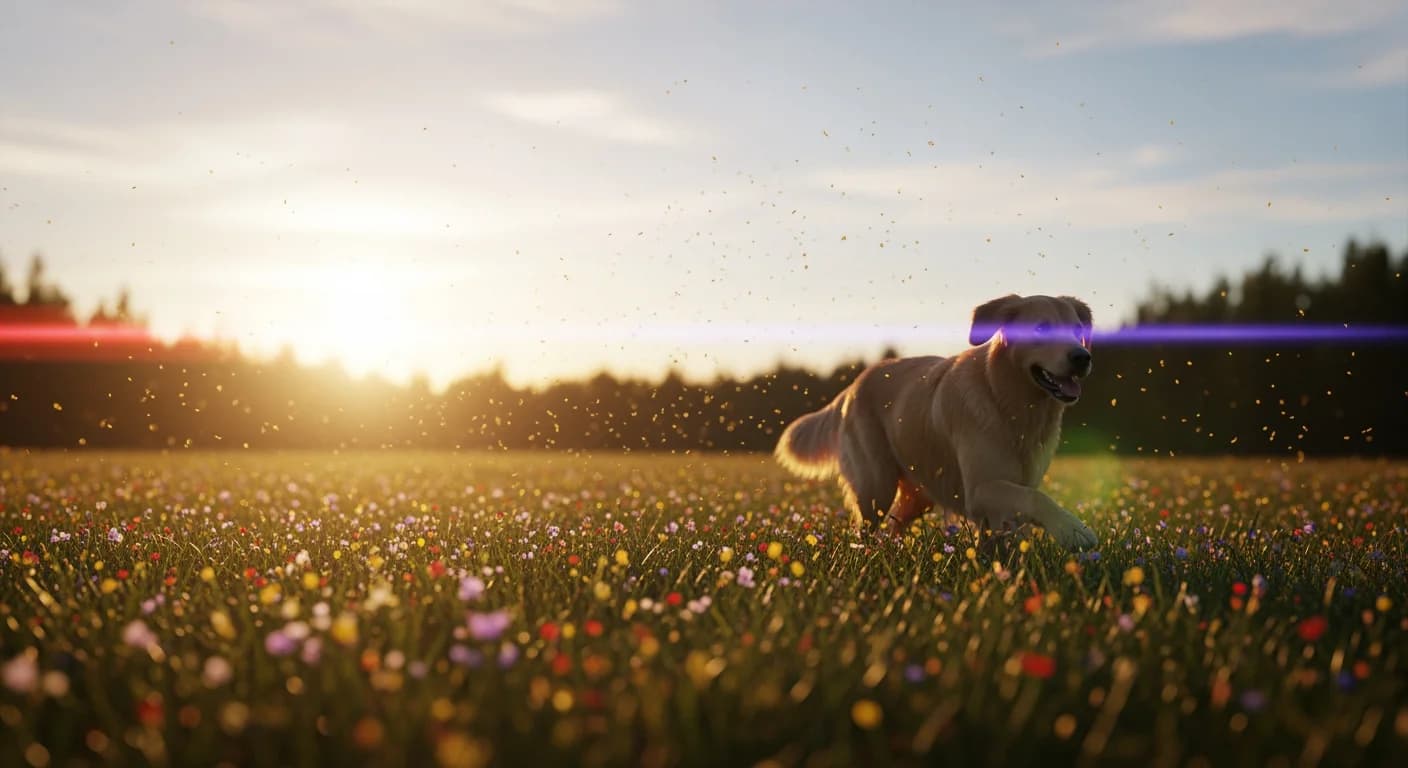
What Is Sora AI?
Sora AI is OpenAI's text-to-video and image-to-video generation system. You provide a written description of a scene -- or upload a reference image -- and Sora produces a video clip that matches your input. The output ranges from 10 to 25 seconds depending on the model tier.
What separates Sora from earlier video generation tools is its approach. Most AI video generators predict the next frame based on previous frames, which leads to visual inconsistencies: objects that morph, characters that change appearance, physics that feel wrong. Sora processes entire video sequences as unified data structures, maintaining object permanence, consistent lighting, and realistic physics across every frame.
OpenAI describes Sora as a "world simulator" rather than a video generator. A video generator produces plausible-looking frames. A world simulator understands that a ball thrown in the air must come back down, that reflections in water mirror the scene above, and that a person walking behind a tree should reappear on the other side. Sora does not always get these things perfectly right, but the architecture aims for physical understanding rather than visual imitation.
A Brief History of Sora
Sora's development has moved quickly:
-
February 2024 -- Sora 1 (Research Preview): OpenAI revealed Sora with demo videos that generated massive attention. The model could produce videos up to 60 seconds long -- impressive for the time. However, physics were inconsistent. Objects morphed between frames, characters changed appearance, and surfaces sometimes behaved like liquid. It remained a research preview with limited access.
-
September 2025 -- Sora 2 (Production Release): The version that brought Sora to general availability. Sora 2 addressed the major weaknesses of Sora 1 with significantly improved physics simulation, character consistency across frames, and reliable object permanence. This is the version most people use today.
-
March 13, 2026 -- Sora 1 Sunset (US): OpenAI officially retired Sora 1 in the United States, marking the full transition to the Sora 2 generation of models.
Today, the Sora family includes three distinct models, each built on the Sora 2 foundation but optimized for different use cases.
How Does Sora AI Work? The Architecture Explained
Understanding how Sora works helps explain both its strengths and its limitations. The technical foundation is a Diffusion Transformer (DiT) -- a hybrid architecture that combines the generative power of diffusion models with the sequence-processing ability of transformers.
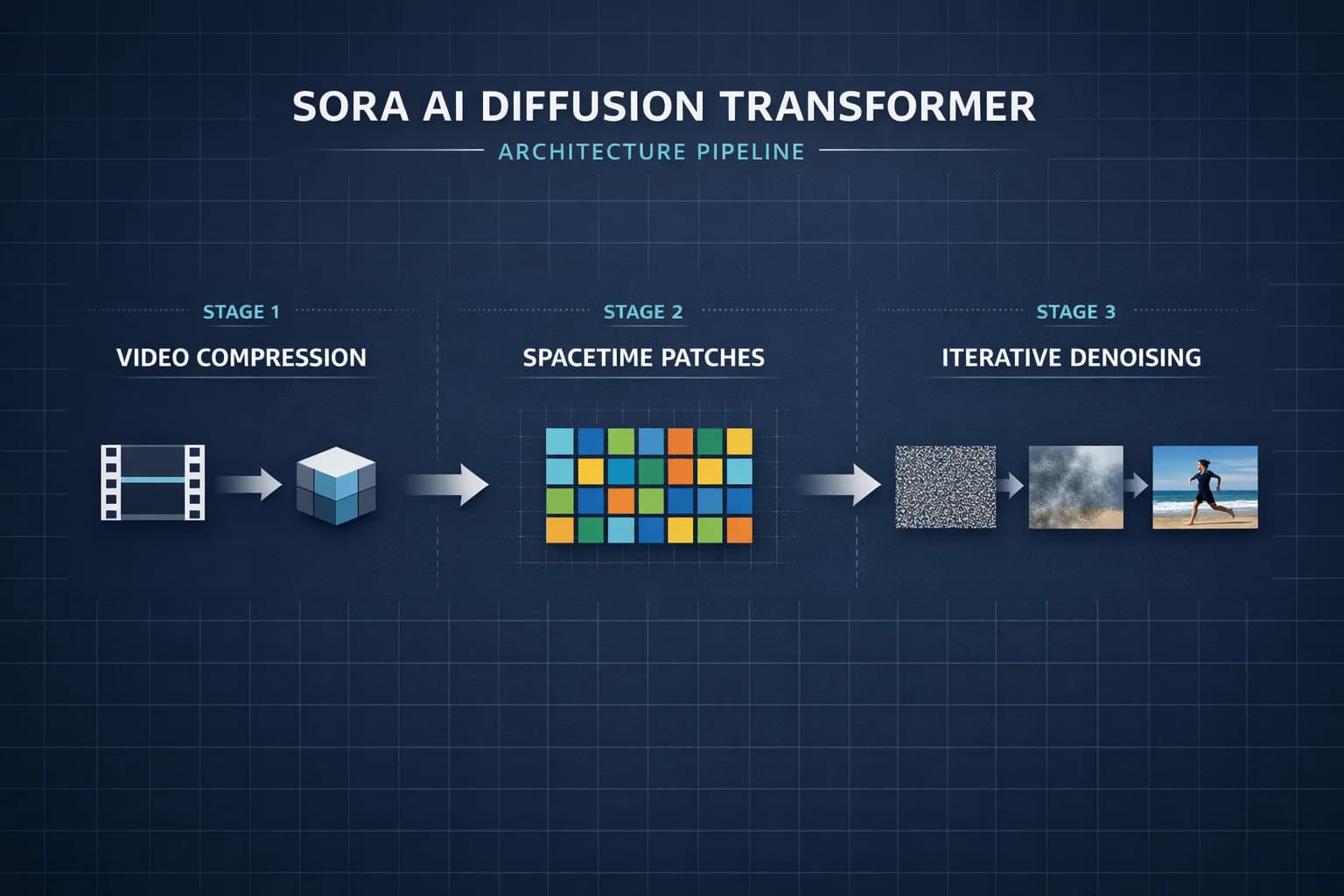
Here is how the pipeline works, step by step:
Step 1: Video Compression Network
Raw video contains enormous amounts of data. A single second of 1080p video at 24 frames per second is roughly 150 million pixel values. Processing this directly would be computationally impossible.
Sora uses a video compression network (based on VAE/VQ-VAE architecture) to reduce raw video into a compact latent space. Think of this as creating a highly compressed representation that captures the essential visual information -- shapes, textures, motion, lighting -- while discarding redundant pixel-level detail.
Step 2: Spacetime Latent Patches
This is the key architectural innovation. Once video is compressed into latent space, Sora divides it into spacetime latent patches -- small chunks that represent both spatial regions (parts of a frame) and temporal sequences (how those regions change over time).
These patches function like text tokens in language models. Just as GPT processes a sentence as a sequence of tokens, Sora processes video as a sequence of spacetime patches. This unified representation lets the transformer reason about space and time simultaneously rather than treating each frame independently.
Step 3: CLIP-Based Text Conditioning
When you write a prompt like "a golden retriever running through sunflowers at sunset," Sora needs to connect those words to visual concepts. It uses CLIP-based conditioning to create this bridge.
CLIP (Contrastive Language-Image Pre-training) maps text and images into a shared representation space. Your text prompt gets encoded into this space, creating a conditioning signal that guides generation toward content matching your description. The model understands "golden retriever" not as two words but as a visual concept with specific shapes, colors, and expected behaviors.
Step 4: Iterative Denoising
The actual generation happens through iterative denoising. The process starts with random noise in the latent space and progressively removes that noise over many steps, guided by the CLIP conditioning signal from your prompt.
Each denoising step refines the latent representation, gradually resolving random noise into recognizable structures: shapes emerge first, then textures, then fine details. Because the model operates on spacetime patches rather than individual frames, temporal coherence is built into the process rather than added as an afterthought.
Why This Matters for Output Quality
This architecture explains several things about Sora's behavior:
- Object permanence works because the model processes entire temporal sequences, not frame-by-frame predictions
- Physics feel realistic because spacetime patches encode motion patterns learned from real-world video data
- Text rendering is relatively strong (84% readability) because CLIP conditioning maps text concepts accurately into visual space
- Generation takes time (averaging 128 seconds for a 20-second clip) because iterative denoising requires many refinement passes
Sora AI Models: What Is Available Today
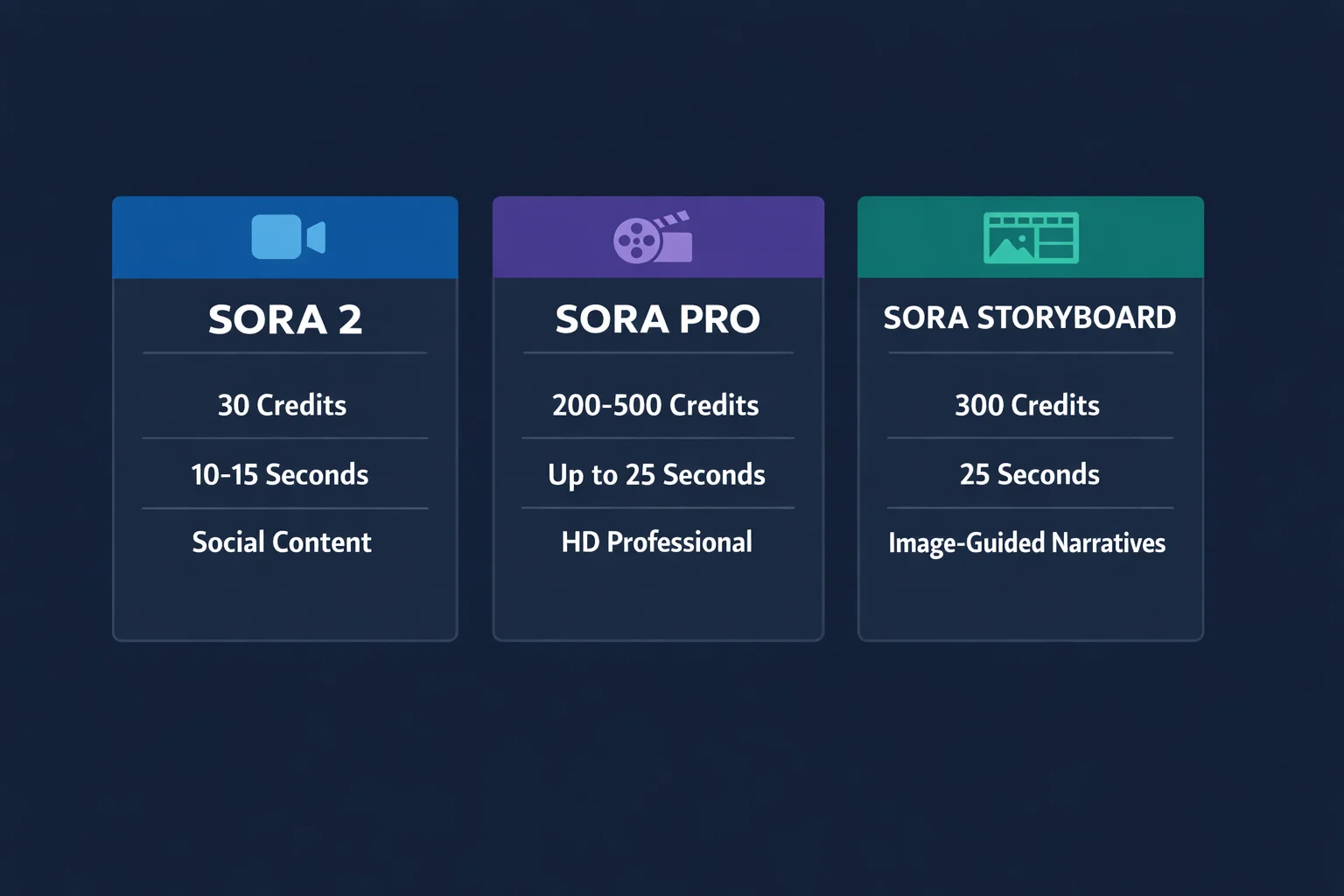
The Sora family includes three models, all accessible through LumeReel's Sora hub. Each targets a different use case and budget.
Sora 2 -- The Everyday Creator Model
Sora 2 is the standard model and the most affordable entry point into Sora video generation. At 30 credits per generation, it produces 10 to 15-second clips from either text prompts or image inputs.
Best for: Daily social media content, TikTok videos, Instagram Reels, YouTube Shorts, rapid prototyping, and any workflow where volume and cost efficiency matter more than maximum resolution.
The quality is solid for mobile-first viewing. Videos look professional on phone screens, which is where the majority of social content gets consumed. Sora 2 supports all three standard aspect ratios (16:9, 9:16, 1:1) and includes watermark removal.
Sora Pro -- Professional and Commercial Grade
Sora Pro is the premium tier. It outputs at 720p HD (200 credits) or 1080p Full HD (500 credits) and extends the maximum duration to 25 seconds.
Best for: Client deliverables, marketing campaigns, product demonstrations, corporate presentations, broadcast content, and any project where HD quality directly impacts outcomes.
The physics simulation in Sora Pro is noticeably superior -- OpenAI describes it as "simulation-grade" compared to Sora 2's Newtonian approximation. Fluid dynamics, fabric movement, and light transport all behave with greater realism.
Sora Storyboard -- Image-Guided Narrative
Sora Storyboard is a specialized model built exclusively for image-to-video generation. At 200 credits, it produces a fixed 25-second narrative sequence from a reference image.
Best for: Animating concept art, product photography, storyboard frames, pitch presentations, film previsualization, and any project that starts with a visual reference that needs to come to life.
Storyboard does not support text-only generation. You must provide an image. The model analyzes your image's visual characteristics -- color palette, lighting, artistic style, composition -- and preserves them throughout the generated video. Your text prompt then describes the motion and narrative development over the 25-second sequence.
Model Comparison at a Glance
| Feature | Sora 2 | Sora Pro | Sora Storyboard |
|---|---|---|---|
| Credits | 30 | 200 (720p) / 500 (1080p) | 200 |
| Max Duration | 15 seconds | 25 seconds | 25 seconds (fixed) |
| Resolution | Standard | HD 720p / 1080p | Standard |
| Text-to-Video | Yes | Yes | No |
| Image-to-Video | Yes | Yes | Yes (required) |
| Physics Engine | Newtonian | Simulation-grade | Narrative-optimized |
| Best Use Case | Social media | Commercial / HD | Image animation |
Sora AI Performance: What to Expect
Setting realistic expectations helps you get the most from Sora. Here are the performance benchmarks based on real-world testing:
| Metric | Result |
|---|---|
| Text rendering readability | 84% |
| First-generation usability | 71% |
| Avg render time (20s HD clip) | 128 seconds |
| Render time variance | +/- 23 seconds (18%) |
71% first-generation usability means roughly 7 out of 10 videos are usable without re-rolling. This is strong for AI video generation, but it also means you should expect to generate a few takes before landing on the result you want. Budget for 1-3 generations per concept.
84% text readability is notably high. If your video includes signs, titles, brand names, or on-screen labels, Sora handles these better than most competing models. However, complex text with small font sizes or unusual fonts may still render imperfectly.
128-second average render time means you are not getting instant results. Plan your workflow accordingly -- queue up several generations rather than waiting for each one individually.
How to Use Sora AI: A Practical Guide
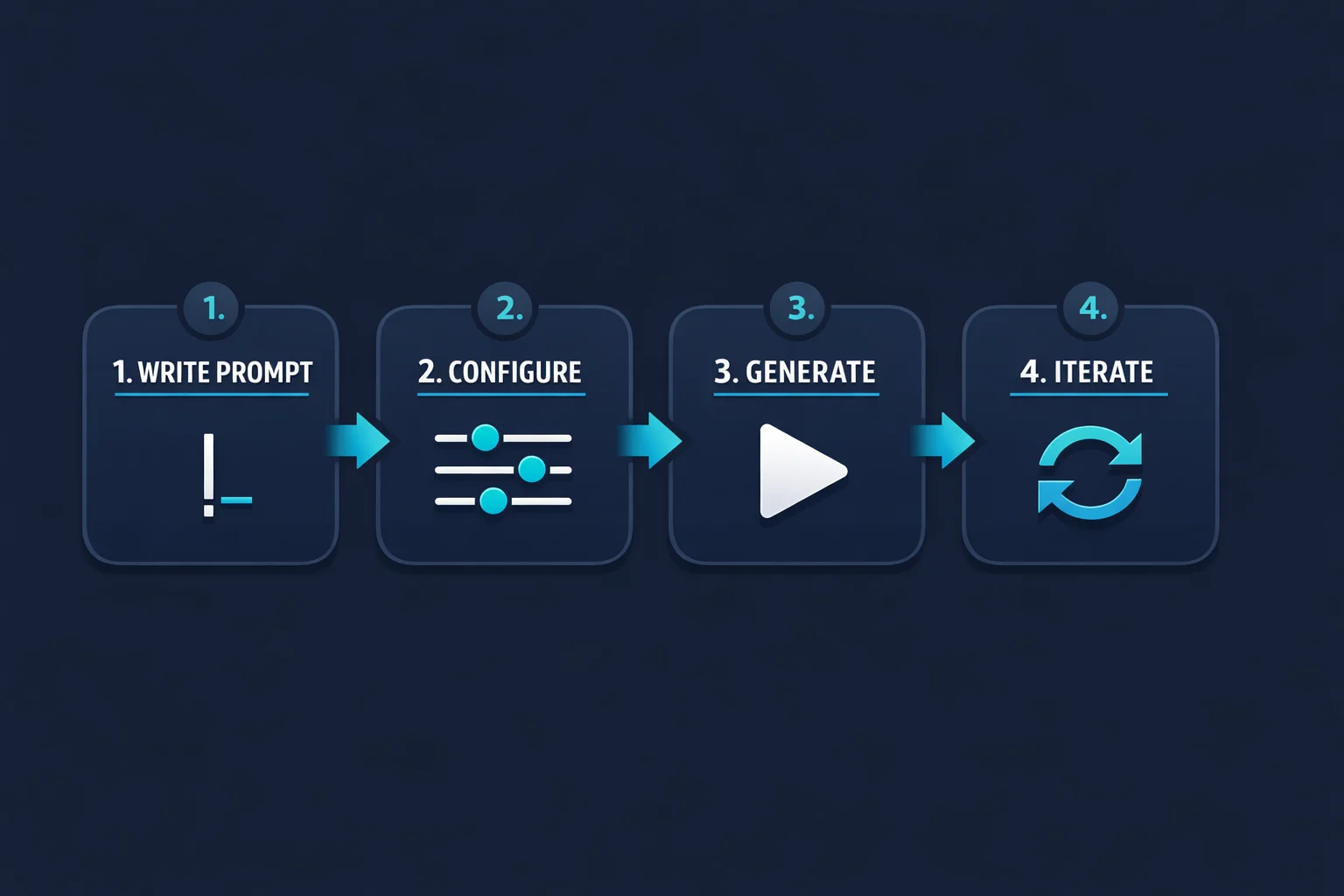
Getting started with Sora on LumeReel takes a few minutes. Here is the workflow:
1. Choose Your Model
Start with Sora 2 if you are new. At 30 credits it is the lowest-risk way to learn how Sora responds to prompts. Once you understand the system, graduate to Sora Pro for HD work or Sora Storyboard for image-driven projects.
2. Select Your Input Mode
- Text-to-video: Write a description of the scene you want. Include details about subject, action, environment, lighting, camera movement, and visual style.
- Image-to-video: Upload a reference image and describe the motion you want applied to it.
3. Write an Effective Prompt
Prompt quality directly affects output quality. Include details about the subject, action, environment, lighting, camera movement, and visual style. Be specific rather than vague.
Good prompt example: "A golden retriever running through a field of sunflowers at sunset, slow motion, cinematic lighting, shallow depth of field, camera tracking alongside the dog at ground level"
Weak prompt example: "Dog in flowers" (too vague, gives the model insufficient direction)
4. Configure and Generate
Select your duration, aspect ratio (16:9, 9:16, or 1:1), and any additional options like watermark removal. Submit your prompt and wait for generation (typically 1-3 minutes). Most creators find their best results after 1-3 iterations.
Real-World Use Cases for Sora AI
Sora serves a wide range of creative and commercial needs. Here are the most common applications:
Social Media Content Creation
The most popular use case by volume. Creators use Sora 2 to produce TikTok videos, Instagram Reels, and YouTube Shorts at scale. At 30 credits per video and 10-15 second durations, the economics work for daily posting schedules. A creator publishing three videos per day spends roughly 90 credits -- far less than traditional video production costs.
Marketing and Advertising
Marketing teams use Sora Pro for campaign assets, product launch videos, and brand content. The 1080p output meets broadcast standards, and the 25-second duration accommodates complete commercial narratives. Agencies generate concept videos for client pitches before committing to full production budgets.
Product Demonstrations
E-commerce businesses animate product photography using Sora 2 or Storyboard. Static product shots become dynamic demonstrations showing the product in context, from multiple angles, or in use. Product pages with video consistently outperform those with static images alone.
Education, Training, and Previsualization
Educators create visual explanations of abstract concepts -- scientific processes, historical events, and complex systems become tangible when shown as video. Directors use Sora Storyboard to convert storyboard frames into animated previz sequences, evaluating camera movements and scene blocking before expensive principal photography.
Character Consistency with Characters/Cameo
Sora includes a Characters feature (also called Cameo) that maintains identity consistency across multiple generations. This is critical for serialized content, brand mascots, or any multi-clip project where the same character must appear consistently across scenes.
Sora AI vs Other Video Generators
Sora operates in an increasingly competitive field. Here is how it compares to the major alternatives:
| Feature | Sora (OpenAI) | Kling (Kuaishou) | Veo (Google) | Wan (Alibaba) |
|---|---|---|---|---|
| Architecture | Diffusion Transformer | Proprietary | Proprietary | Proprietary |
| Max Duration | 25 seconds | 10 seconds | Varies | Varies |
| Audio Generation | No | Yes (Kling 2.6) | Varies | No |
| Text Rendering | 84% readability | ~60% | Varies | Varies |
| Price Range | 30-500 credits | 100-140 credits | Varies | Varies |
| Image-to-Video | All models | Most models | Yes | Yes |
Sora's main advantages are longer duration, superior physics, and strong text rendering. Its main limitations are no audio generation and no fine-grained controls like CFG adjustment. For a detailed head-to-head analysis, see our Sora vs Kling comparison.
How Much Does Sora AI Cost?
Sora pricing on LumeReel is credit-based, giving you flexibility to use different models based on each project's needs.
| Model | Credits per Generation | Duration | Cost per Second |
|---|---|---|---|
| Sora 2 | 30 | 10-15s | 2-3 credits/s |
| Sora Pro (720p) | 200 | Up to 25s | 8 credits/s |
| Sora Pro (1080p) | 500 | Up to 25s | 20 credits/s |
| Sora Storyboard | 200 | 25s (fixed) | 8 credits/s |
New users receive starter credits to try any model free. Subscription plans offer discounts of 24-53% off standard rates.
The most cost-effective workflow: prototype with Sora 2 at 30 credits, then re-generate your best concepts with Sora Pro for HD quality. This keeps experimentation cheap while delivering professional output when it counts.
Current Limitations of Sora AI
No AI video tool is perfect. Being upfront about limitations helps you plan accordingly:
- No audio generation: All Sora output is silent. You need to add sound separately.
- Generation time: Averaging over two minutes per clip, Sora is not instant.
- 71% first-try success rate: Expect to generate multiple takes for important projects.
- Maximum 25 seconds: Even at the Pro tier, longer content requires combining multiple generations.
- Physics imperfections: While dramatically improved over Sora 1, complex multi-object interactions can still produce occasional artifacts.
These limitations are shrinking with each update. The jump from Sora 1 to Sora 2 addressed the most critical issues, and further improvements are expected as the technology matures.
Getting Started with Sora AI on LumeReel
LumeReel provides access to all three Sora models alongside other generators like Kling, Veo, and Wan in a single workspace. Your credits work across every model, so you can compare results without being locked into a single provider.
- All Sora models in one place: Sora 2, Sora Pro, and Sora Storyboard are all available
- Multi-model access: Compare Sora output against Kling, Veo, Wan, and other generators using the same credits
- No watermark option: Clean output for professional and commercial use
- Generation history: Browse, organize, and download all your past generations
- Free starter credits: Try before you buy with credits that work on any model
Ready to see what Sora AI can do? Use the prompt tool at the top of this page to generate your first video right now. Start with the pre-loaded prompt or write your own -- it takes less than three minutes from prompt to finished video.
FAQ
Answers to common questions about this experience.